
Software · PathLift · Support · App privacy
A small utility for your Mac
PathLift
Your paths. Ready to paste.
Lift a file or folder path straight from Finder. Copy it in the format you need, then paste it into Terminal, a document, or your next task.
Coming to the Mac App Store
Explore setup and support
macOS 12 or later · Apple Silicon and Intel · No subscription
One Finder button. Either path.
Select files or folders and copy their paths. Or copy the folder you’re viewing, even with an item selected inside it. PathLift stays in your menu bar, with no Dock icon.
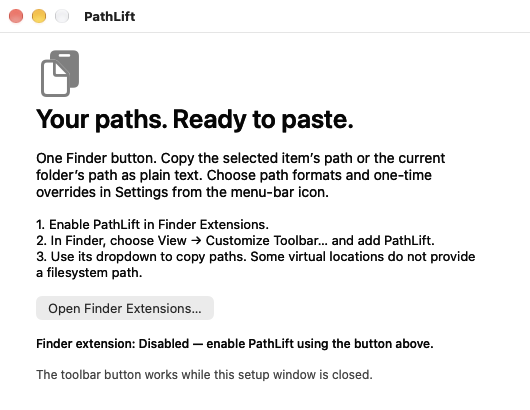
Finder Setup walks you through enabling the extension and adding the toolbar button. The screenshot shows the first-run setup, before the extension is enabled.
The format your next task needs.
Full filesystem path
/Users/alex/Documents/Report.pdf
File URL
file:///Users/alex/Documents/Report.pdf
Filename only
Report.pdf
Relative to the Finder folder
images/logo.png
Also shorten your home folder to ~, or convert paths on mounted SMB shares into SMB URLs and Windows UNC paths. Choose newlines, spaces, or tabs for multiple selections.
Examples illustrate the output formats. Network formats require a mounted SMB share and may need a read-only folder permission.
Your default. Or just this once.
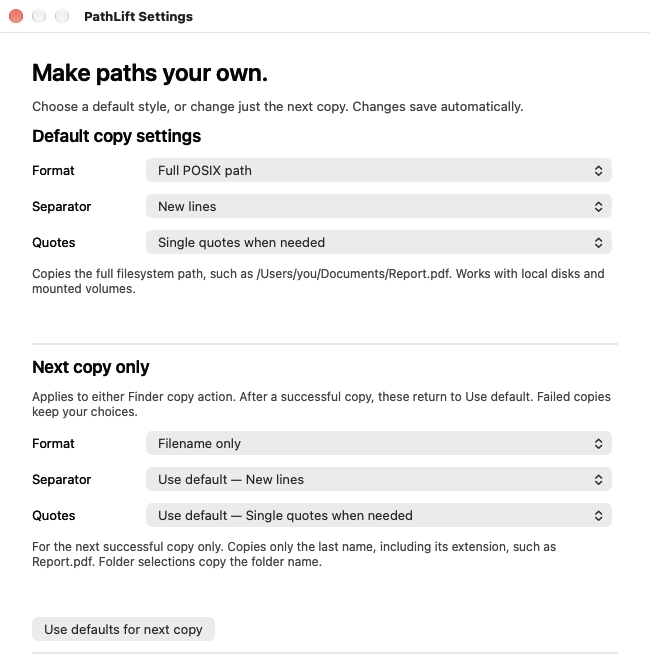
Save the format you use most. Set a different format, separator, or quoting option for the next successful copy without changing your defaults. Optional single quotes preserve spaces and shell-special characters in filesystem paths.
Local work stays local.
No analytics, advertising, separate account, or copy history. PathLift formats paths on your Mac. You choose when to copy them and where to paste them.
Pay once for version 1.
£2.99 UK · $2.99 USA · €2.99 euro pricing in the EU
Planned launch prices. Your purchase includes updates to version 1, which does not expire. Future major versions may be separate, optional purchases.
Local-currency pricing in EU storefronts that do not use euros will be shown in the App Store.